Bose QC Earbuds
- 4.7
- Rating
- 500.00K
- Installs
- Free
- Price

 Analysis by App-foxy
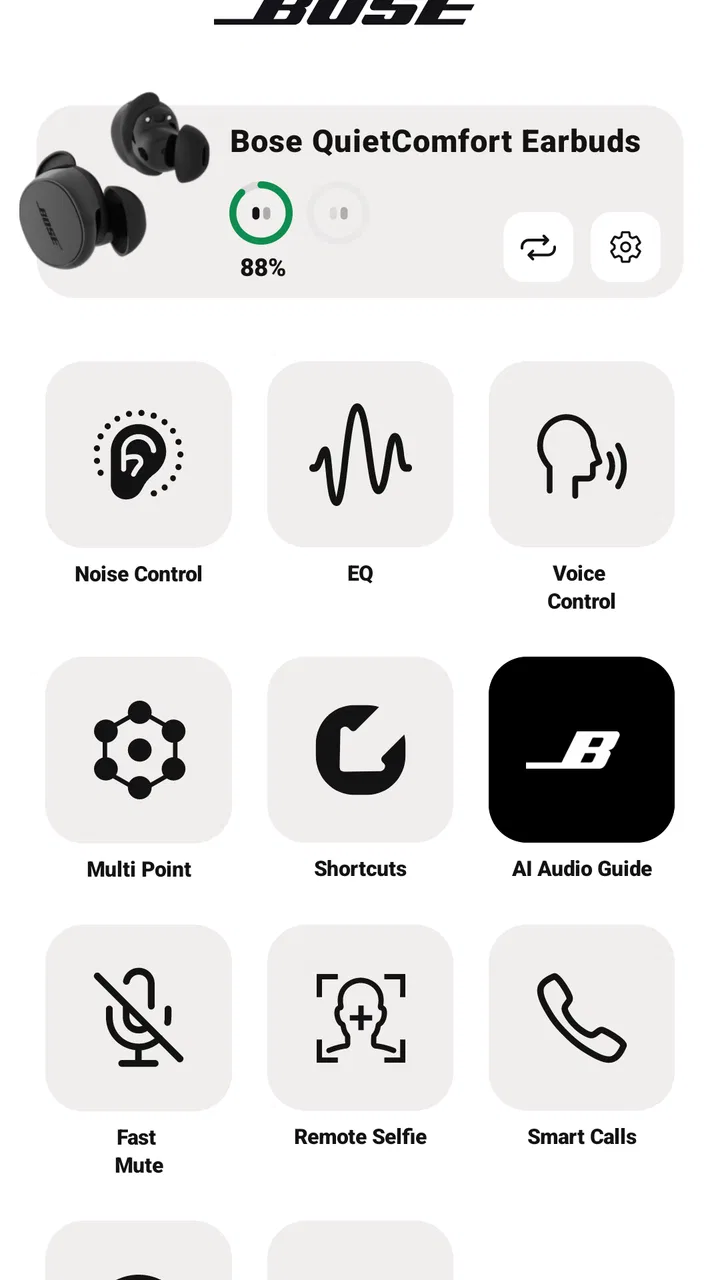
I spent time with Bose QC Earbuds as the companion app for Bose wireless earbuds, and my first impression is that it is less about playing music than about making the earbuds behave the way I want. That distinction matters. If you only need a simple Bluetooth connection, your phone already does most of that. The value here appears when you want to manage listening modes, check the condition of the earbuds, adjust the experience, and keep settings in one place.
This is a free Music & Audio app from Bose Corporation, available for everyone and designed for devices running Android 10 or later. Its current version is 3.0.2, and it arrived on September 15, 2024. Those details place it firmly in the role of a current control center for Bose QC Earbuds rather than a general-purpose music player. I would recommend installing it if you own compatible Bose earbuds, but I would not treat it as an essential download for someone who is only browsing audio apps.
What the current app is really for
The most useful way to think about this app is as a settings layer between your earbuds and your phone. Music services still handle the songs, podcasts, and audiobooks. Your phone still handles notifications and calls. Bose QC Earbuds gives you the controls that are specific to the earbuds themselves, which is why the experience makes more sense after the first pairing than before it.
You May Also Like

 Blood Strike: 2.5 Anniversary
Blood Strike’s Loadouts Turn Every Drop Into a Tactical Gamble
A close look at Blood Strike’s custom loadouts: how fast access to signature weapons reshapes its battle royale rhythm, rewards preparation, and narrows the gap between fights.

 Pandora - Music & Podcasts
Pandora’s Music Is Easy to Start, but Harder to Recover
Pandora’s strength is its low-effort path from a seed to a station. Its weak spot is how much confidence it asks you to place in connection, setup, and quiet recovery.

 8 Ball Pool
 Is Built on Rivalries, Rematches, and Routine
A close look at the rivalries, rematches, shared routines, and unanswered safety questions that turn a quick pool match into a persistent mobile community.

 Samsung Music
’s Quiet Strength Is Playing What You Already Own
Its reach comes less from spectacle than from dependable access to a personal library. That simplicity is both the app’s strongest retention engine and its ceiling.

 AccuWeather: Weather Radar
AccuWeather Review: A Quick, Clear Forecast for Everyday Decisions
For everyday plans, the best forecast is the one you can understand quickly. AccuWeather makes rain timing, radar, and local conditions easy to act on, with a few trade-offs.

 Hill Climb Racing
Why Hill Climb Racing Still Turns Crashes Into One More Run
A tiny car, a bumpy hill and one more upgrade: Hill Climb Racing keeps resurfacing because its simple chaos makes every near-miss feel personal.
More From Our News Desk
View All News


In everyday use, I would open it when I wanted to check whether the earbuds were connected, inspect their status, or change the way they respond to my surroundings. That is more convenient than searching through ordinary Bluetooth menus, where the available options are usually limited to pairing, disconnecting, and perhaps renaming a device. The app gives the Bose hardware a more understandable home.
That focus is also its main limitation. It is not a replacement for Spotify, Apple Music, YouTube Music, a podcast service, or a local audio player. If your goal is to discover music, organize playlists, or stream radio, this is the wrong category of app. I see it as a companion utility: quiet and practical when everything is set up correctly, but important when you need to fine-tune the listening experience.
The public response is encouraging, with a 4.6 average from around 23 thousand ratings and more than 500 thousand installs. I would read those figures as evidence that many Bose owners find the companion approach worthwhile, not as a guarantee that every phone and earbud combination will feel identical. Companion apps are especially sensitive to operating-system behavior, Bluetooth state, and the exact hardware being used.
Getting started without unnecessary frustration
My advice is to pair the earbuds through the normal Bluetooth process first, then open the app and let it identify the product. Starting with the phone’s Bluetooth settings makes it easier to tell whether a problem belongs to the earbuds, the phone connection, or the app itself. If you jump straight into troubleshooting inside the app, you can end up chasing a software symptom when the real issue is simply that the earbuds are not connected.
It is also worth giving the app a moment after opening it. Companion utilities often need to read the state of both earbuds and their charging case before every detail is available. If the screen looks incomplete, I would close and reopen the app only after checking that the earbuds are awake and close to the phone. That small routine is more useful than repeatedly tapping buttons while the hardware is still asleep in the case.
The age rating of Everyone is appropriate for the role the app plays. It is a device-management tool rather than a social platform or a content service, so parents are not choosing it for an audio catalog or a community feed. The important question is compatibility: the app is intended for Bose QC Earbuds, and people using unrelated headphones should not expect it to become a universal controller.
What version 3.0.2 tells me about its direction
The move to version 3.0.2 suggests a relatively mature product rather than a first experiment. I would not interpret the version number alone as proof of a dramatic redesign, and I would avoid promising a specific new feature just because the release is recent. What I can say is that the app’s current identity is clear: it supports the Bose QC Earbuds experience and keeps the controls associated with that hardware in a dedicated place.
That is a sensible evolution from the usual bare Bluetooth connection. Earbuds have become more dependent on personal settings, and a manufacturer’s app is where those settings can be presented in a way that ordinary system menus cannot. The useful change is therefore not necessarily a flashy visual feature. It is the consolidation of device management into an interface that is easier to revisit when your listening habits change.
I particularly value this kind of evolution when moving between situations. The settings that work during a quiet evening are not always the settings I want on a commute, in an office, or while walking outdoors. A companion app gives me a place to make those adjustments deliberately instead of accepting whatever the earbuds happen to do after pairing. That makes the app feel like part of the product, not an unrelated download.
Still, I would keep expectations realistic. A version update cannot change the physical fit of the earbuds, the quality of your phone’s Bluetooth radio, or the noise around you. It can make controls clearer and device management easier, but it cannot turn a poor fit into a comfortable one or make every connection problem disappear. The app is a useful layer around the hardware, not a substitute for hardware quality.
How existing Bose users benefit
If you already own the earbuds, installing the app is most valuable during the first few days. That is when you are deciding whether the default behavior suits you. Instead of leaving every setting untouched, I would use the app as a short setup session: connect the earbuds, inspect the available controls, test the listening behavior in a familiar room, and then repeat the test somewhere noisier.
A practical example is a morning commute. At home, I might connect the earbuds while preparing breakfast and start an audiobook. Once I leave, traffic and surrounding voices change what I need from the earbuds. The app gives me a direct route to the Bose-specific controls rather than forcing me to rely on the phone’s generic Bluetooth page. When I return to a quiet room, I can adjust things again instead of leaving an outdoor setting active all day.
Another useful workflow is checking the earbuds before an important call. I would open the app, make sure the expected device is connected, and confirm that both earbuds are recognized before joining the call. This does not guarantee that a meeting app will behave perfectly, but it reduces one common source of uncertainty: not knowing whether the earbuds are actually ready.
I also like the app as a diagnostic starting point. When one earbud seems silent, the first step should be simple: check the connection and the device state before assuming the hardware has failed. If the app sees the earbuds normally, I would then inspect the phone’s audio output and the music app. If the app cannot establish a proper connection, I would move on to Bluetooth troubleshooting. This separation saves time because it prevents every audio problem from being treated as the same problem.
For someone who owns multiple Bluetooth accessories, the dedicated Bose interface can also reduce confusion. Phone settings often show several similarly named devices, especially after years of pairing speakers, cars, and headphones. Opening the Bose app when I specifically want to manage the QC Earbuds is more direct than scrolling through a long device list and hoping I choose the right entry.
Where it compares well with ordinary alternatives
The obvious alternative is using only the phone’s Bluetooth settings. That approach is faster for a first connection, but it usually stops at the basics. You can pair and disconnect, yet the phone may not expose the controls that make Bose earbuds feel personal. For an owner who never changes anything after pairing, the system menu may be enough. For anyone who wants more control, the Bose app is the better fit.
Another alternative is relying on the music app itself. A streaming service can change playback quality, volume, and sometimes audio effects, but it does not replace a hardware companion. Music apps do not know the full state of your earbuds, and they are not designed to manage Bose-specific behavior. I would use both: the music app for content, Bose QC Earbuds for the earbuds.
Compared with a generic headphone-control utility, the Bose app has the advantage of being tied to the manufacturer’s own product line. That usually makes the organization more relevant because the controls are presented around the actual Bose earbuds rather than a broad collection of unrelated brands. The trade-off is obvious: its usefulness is narrow. If you switch frequently between Bose and other manufacturers, you may end up maintaining several companion apps.
This is why I would not recommend downloading it before buying or borrowing compatible Bose hardware. Without the earbuds, there is little reason to keep the app installed. It is not a trial version of a music service, and it does not become more useful simply because it has a high rating. Its strengths appear when it has a real device to manage.
Small habits that make the app more useful
One non-obvious benefit of a dedicated companion app is that it encourages deliberate testing. Rather than changing several settings at once, I would alter one control, listen for a few minutes, and then decide whether the result is actually better. This matters because a setting that sounds impressive for one song may become tiring during a long podcast or phone call. Treating the app like a tuning tool produces better results than chasing the most dramatic effect.
I would also keep a simple mental note of which setup works in each environment. For example, the configuration I prefer at a desk may not suit a busy street. The app is most helpful when I use it to support that distinction, not when I expect one universal setting to work everywhere. This is a realistic trade-off: more control can improve comfort, but it also gives me more decisions to make.
A second useful habit is to check the app before blaming a streaming service for a sudden change in sound. If the same issue appears across music, video, and spoken audio, the earbuds or connection deserve attention first. If it appears only in one service, the service or phone output is more likely involved. The app cannot diagnose every cause, but it helps narrow the search.
A third is to use it before handing the earbuds to another person. I would disconnect them from my phone, make sure they are not still actively routing audio, and let the next user begin with a clean pairing attempt. This is especially helpful in a household where several phones are nearby. Many “the earbuds will not connect” complaints are really old connections competing with the new one.
Finally, I would avoid opening the app every time I simply want to listen. Once the earbuds are configured, the fastest routine is usually to connect and play. The app earns its place when I need management, not as an extra step in every listening session. That distinction keeps the companion experience convenient instead of turning it into unnecessary maintenance.
Remaining gaps and situations where I would skip it
The biggest friction is that the app adds another layer to a process that should feel simple. If pairing is reliable and you are happy with the default behavior, opening a companion app can feel like work. Some users will prefer the minimal route: take the earbuds out, connect, and start listening. For them, the app may be useful once and then sit unused.
I would also skip it if I do not own Bose QC Earbuds. The free price is welcome, but free does not mean universally useful. Installing brand-specific utilities for hardware you do not use only adds clutter, and this app is not a general control panel for every pair of wireless earbuds.
People who want one app to manage headphones from several brands may be happier with the basic controls built into their phone, even if those controls are less detailed. The Bose-focused approach is a strength for Bose owners and a weakness for mixed-brand households. There is no perfect choice here; it depends on whether device-specific control matters more than having a single, simple Bluetooth workflow.
There is also a learning curve in deciding which settings deserve attention. More options are not automatically better, especially for someone who does not enjoy adjusting audio equipment. I would recommend changing things gradually and returning to the default when a setting makes listening feel less natural. The best setup is the one that disappears during use.
As with any wireless-earbud companion app, the phone remains part of the equation. A weak connection, an aggressive battery-saving mode, or another active Bluetooth device can create behavior that looks like an app fault. I would not judge the app fairly until I had tested the earbuds close to the phone, checked the ordinary Bluetooth connection, and tried the same action again after restarting the app.
What I would watch in future updates
For future versions, I would pay attention to how quickly the app reflects the real state of the earbuds. A companion app is most trustworthy when its connection information, device status, and controls match what I hear and feel without delay. Clear feedback is more important to me than decorative redesign because it directly affects troubleshooting.
I would also watch whether Bose continues to make everyday actions easier for existing owners. The best updates are the ones that reduce the number of steps needed to move from one listening situation to another. If the app can keep advanced controls accessible without making the basic path complicated, it will serve both enthusiasts and people who only want their earbuds to work.
Another point worth watching is how well the app handles the boundary between current evidence and future expectations. Version 3.0.2 is the version I can assess today; it should not be treated as a promise of what later releases will add. I would rather see a stable, understandable control experience than a long list of speculative features that make the app harder to navigate.
Ultimately, my recommendation is straightforward. Bose QC Earbuds is worth installing when you own the matching Bose earbuds and want more than basic Bluetooth pairing. It is especially useful during setup, when changing listening situations, and when checking whether a problem belongs to the earbuds or the phone. It is less compelling as a standalone download, and people satisfied with default settings may rarely open it after the initial configuration.
The app’s free cost, Everyone rating, Bose Corporation development, and current 3.0.2 release make it an easy companion to try for the intended hardware. I would keep it installed if I regularly adjust my earbuds or want a dedicated place to manage them. If I only need music playback, I would spend my time in my preferred audio service instead. That balance is what makes the app useful: it does not try to be the whole listening experience, but it gives Bose QC Earbuds a more practical one.
FAQs for Bose QC Earbuds
01What are the key features of the Bose QC Earbuds app?
The Bose QC Earbuds app offers a range of features designed to enhance your listening experience. Key features include customizable noise cancellation, personalized sound settings, and the ability to manage connected devices. The app also provides firmware updates, ensuring your earbuds are always equipped with the latest enhancements and features.
02Is the Bose QC Earbuds app compatible with both Android and iOS devices?
Yes, the Bose QC Earbuds app is compatible with both Android and iOS platforms. This ensures a seamless experience across different devices, allowing users to fully utilize all features and capabilities of their Bose QC Earbuds, regardless of their preferred mobile operating system.
03How does the noise cancellation feature work in the Bose QC Earbuds app?
The Bose QC Earbuds app allows users to adjust the level of noise cancellation to suit their environment. Using the app, you can switch between different modes, such as full noise cancellation for quiet environments or a transparency mode to let outside sounds in when needed, providing optimal listening experiences in various situations.
04Are there any subscription fees associated with the Bose QC Earbuds app?
No, there are no subscription fees for using the Bose QC Earbuds app. It is free to download and use, allowing you to access all features and updates without any additional costs. This ensures that you can make the most of your Bose QC Earbuds without worrying about extra expenses.
05How can I troubleshoot connectivity issues with the Bose QC Earbuds app?
If you encounter connectivity issues with the Bose QC Earbuds app, ensure that your earbuds are charged and within range of your device. Restarting your device and reconnecting Bluetooth can often resolve minor issues. Additionally, the app offers troubleshooting guides that provide step-by-step solutions to common connectivity problems.
Pros
- Excellent noise cancellation capabilities.
- Comfortable fit for long-term wear.
- Intuitive touch controls for easy use.
- Impressive battery life with quick charging.
- High-quality audio performance.
Cons
- Bulkier design compared to competitors.
- Limited customization in app settings.
- Higher price point than alternatives.
- Occasional connectivity issues reported.
- No multi-device pairing feature.

Bose QC Earbuds
Gallery